I will design a free website for you

Showing posts with label Gadget / Mobiles. Show all posts

Saturday, January 8, 2011

Paypal Fees Info Personal Account & Premier/Business Account

Paypal charges different fees if you hold a personal account and different fees when you hold a Premier/Business account and this is not only on the transactions of recieving money but on multiple different kind of transactions ranging from withdrawing money to transferring funds. Check out this table for getting a clear idea on how paypal charges fees on your transactions.
Type Personal Account Premier/Business account
Open an account Free Free
Send money Free Free
Withdraw Funds Free for Rs.7,000.00 INR or
more, Rs.50.00 INR for Rs.6,999.99 INR or less to bank accounts in India
Free for Rs.7,000.00 INR or
more, Rs.50.00 INR for Rs.6,999.99 INR or less to bank accounts in India
Add funds Free Free
Accept the following funded
payments:
* PayPal Balance
* PayPal Instant Transfer
* PayPal eCheck
Free 2.4% + $0.30 USD to 3.4% +
$0.30 USD
Accept credit or debit card
funded payments
5.4% plus $0.30 USD. No
transaction limit for payments sent via Skype, otherwise there is a limit of
5 transactions per year
5.4% plus $0.30 USD for card payments received using PayPal on Skype
2.4% + $0.30 USD to 3.4% +
$0.30 USD
Multiple currency transactions Exchange rate includes a 2.5%
fee. If your transaction involves a currency conversion, it will be
completed at a retail foreign exchange rate determined by PayPal, which is
adjusted regularly based on market conditions.
Exchange rate includes a 2.5%
fee. If your transaction involves a currency conversion, it will be
completed at a retail foreign exchange rate determined by PayPal, which is
adjusted regularly based on market conditions.

Find PC Performance & Test your PC for heavy Usage

Have you ever heard about technology being stress tested? No, then here it is, you can stress test your computer or laptop so that you can have a check on whether your pc, laptop or even server can handle itself in heavy usage or not. This is nothing but just the basic information on benchmarks to check what kind of performance is delivered by your system under heavy usage. So what your system’s performance will be when it is working on full load so that you can check that all the benchmarks are as it is even in full load or not.
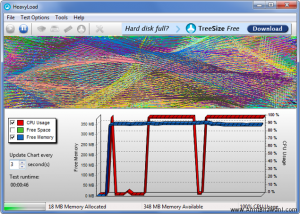
Heavy Load snapshot
So, this can be achieved with a free software tool called HeavyLoad, with simple to use interface and support of almost all operating systems of Windows including the Server editions 2003 and 2008 apart from XP, Vista and 7. As soon as you download and install this software tool, all you will have to do is to just click on a button so that the software tool will perform the complex calculations by writing in large test files to use up the hard disk space and allocates physical or virtual memory till it is filled so that its tested under rigid conditions to pull out those actual benchmarking figures with which you can check your system performance at extreme conditions.
Basically, this software tool just maxes out your CPU, hard disk space and also the memory resources so that you can have a check on how your machine handles itself in a near extreme or in worst situation. This software tool acts as a perfect testing cum monitoring tool which will notify about the specific CPU usage analysis, memory thresholds achieved at extreme on the server which is sometimes very useful for the System administrators so that they can take necessary actions on the Performance analysis.

How to Unlock LG Cell Phones – Tutorial & Procedure

LG Mobile phones which is now one of the fastest growing mobile manufacturers. Recently with the launch of flurry of handsets LG is now aiming to tap the mobile market too from its current portfolio of consumer durables. This can be made by the recent aggressive launch of the Android based budget handsets in the market. As said, the biggest problem with the handset is that these are locked handsets which are locked with the operators. So, now let’s check out how you can unlock the same simply and efficiently and that too in a safe manner, by following a simple procedure, you can unlock your device to the full potential. You can unlock from basic devices to the most advanced device like LG Optimus, LG Optimus One, LG Xenon, LG Neon, LG Chocolate, LG Vu or almost any LG phone you can unlock.
Procedure to unlock your LG Mobile Phone in 3 simple steps:
Step 1: Find your LG Mobile Phone Unlocking Model & Network
First you will have to find the model number of your device which can be easily found from the device’s box packaging or from the sticker which is under the phone’s battery. Now, after identifying the phone’s model number you also will have to find the operator on which your device is locked on to like Vodafone, T Mobile, att or any other. With the operator logo on the home screen of your device, you can easily find the operator on which your device is locked on to.
Step 2: Information required to Unlock Your LG Mobile Phone
Along with the device’s model and the operator name you also will have to provide the details on the IMEI number which can be found easily on the device’s box packaging or just by dialing *#06# from your mobile. Now, after mobilizing the details on model, operator and the IMEI number, you can proceed to get an unlocking code with which you can unlock your device. This unlock code can be easily purchased by using Google Check out service or by PayPal or even you can purchase using direct credit card using Google Checkout or PayPal. You need not worry about the authenticity of the payment services as these are cent percent secure payment gateways.
Step 3: Enter the LG Unlock Code into Your LG Phone
As soon as you purchase the unlock code, you will have to key in the unlock code. To proceed, first you need to select your LG model from the list. If you do not see your phone model in the list, type LG in the search bar at the top and you will find a list of all LG Phones which can be unlocked. Generally all phones from LG can be unlocked by selecting the option Any LG Model.
So with just three simple steps you have successfully learnton how to unlock your locked LG Mobile phone device and can easily use any of the sim card along with the unlocked LG Mobile device.

What is C Class IP & Why is it useful for SEO?

SEO or Search Engine Optimization and IP or Internet Protocol addresses relate to each other. Search Engine sites such as Google, Bing and Yahoo decide where your websites rank based on an algorithm that they keep very private. The more people that see your site, the better. One way to do this is to obtain a high ranking on a search engine. Studies have shown that most people searching for a subject rarely go beyond the first page. So, your goal is to get your website listed on the first page if possible when your subject of your website is researched.
Companies with networks and web sites that are not very numerous use Class C IP addresses. The other classes, A and B, cost more and you have a larger selection of host sites with Class C networks. The Class C option fits best for the demands of the small user. Read more about Classes of IP Addresses.
Since Class C IP addresses allow multiple host sites or web sites to relate back to the same network, the question is how do search engines look at these combination’s. There are two ways. The search engine could look at the websites as separate, or it could look at the network as a single unit. Looking at this system as a single unit only gives the host credit for user activity, and the individual web sites do not receive any credit for their individual activity. This could make your web sites seem to have zero hits when in fact they might be very popular.
The other way a search engine could view your network is by only counting the hits each web site or host receives. This increases the hits recorded by the search engine and should elevate your ranking on the search engine.
Since we don’t really know how the search engine ranks its searches, it is really not possible to know which is true. Many people swear by both ways. If you believe in assuring your web site is noted for its hits, you can purchase a separate Class C IP for each web site that you host.
Your web site will be the only one to use this IP. These can be expensive to set up for each web site, even approaching hundreds of dollars a month. Many of these need to be set up by a technician from the site selling these IP addresses. If you use multiple sites you also run the risk of hitting an IP that is near other web sites that are “bad.” If the IP operator shuts down sites close to yours, you might have your site put out to pasture as well.
A site with a variable network IP that will let you have multiple web sites usually costs only a few dollars a month to operate. This is usually a much cheaper option. Will paying for individual static networks increase your hits? You will have to experiment with this based on your web site usage and what your goals are. You can try static IP addresses out one at a time.

You are here: Home / Apple / Fix Error 100 on Apple Mac App Store Fix Error 100 on Apple Mac App Store

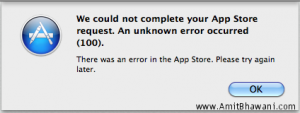
Its not even 24 hours of the launch of the Mac App Store and many of the users of MAC App store are reporting that they are greeted with the error message stating “We could not complete your App Store request. An unknown error occurred (100)”. This error message arrives almost every time as soon as you download any application.
Many of the users tries rebooting the system and it worked as the download of apps again got possible but for which you again have to go with the procedure of agreeing the terms and conditions but some of them have got another versions to disappear this irritant error message like quit the app store and reload the same.
Error 100 Snapshot
And if both the options didn’t work for you then follow this one,
  • First, sign out from the Mac App store, close it and simply reboot.
  • Now, eject or Unmount the Windows Partition (if any)
  • Open the iTunes and download the app of your choice by accepting the terms and conditions which will be displayed on screen.
  • Now, open the Mac App store and try to download the app, you will be able to download the applications.
And even now if you are not able to download the apps then either you will have to try something new to get away with this message or need to wait till Apple gets out with their official version of solution to get this error message out.

5 Reasons why the Apple Mac App Store Sucks

It’s not even a day after the Mac App store launched and already a bunch of problems started pouring in, starting from application downloads to many such problems. So, let’s check out what are the exact issues with the latest Mac App store which is making the Mac App Store as “Not Recommended”. Though the creation of Mac App Store is a great idea as it compiles all the apps under one umbrella but also the issues related to this have to be solved soon.
So let’s check out five reasons on why the Apple Mac App Store sucks:
No Option to Get back Paid Apps
If you have thought that you can re purchase the apps from the Mac app store which you have earlier purchased from the app store then don’t expect this for at least now as Apple haven haven’t provided this feature. Though many of the developers are working to get this feature fixed in but still there is no time frame by when this will be back.
No Trial, Demo or Beta Versions
It was a period of joy when the apps were in trial, demo or even in the beta stage as they are free to try apps and also makes the decision easier whether to buy this if it’s a paid app or not. Also, when it’s in beta stage developers can pump in with several other features with the users requesting about the same. So, in the latest Mac App Store all this have been discontinued, you can now only download either the final versions of the app or the paid versions of the application.
No freeware
Support will be harder to Experience
More than 3/4th apps in the Mac App Store are developed by the third party providers, so anytime the application developer wishes to release the app, Apple behaves like a middleman which first screens the app and then grants the permission to release the same. The problem with this type of release is that if an update needs to be released then it has to get approval from Apple which is a very tedious job as its very time consuming and also doesn’t allow to update the app frequently which hampers the relation between the app developer and the end user as Apple is acting like a middleman.
No paid upgrades
After no trials, beta and demo versions there also will be no paid upgrades to the apps which are downloaded. So next time if your paid app has got an update, then you need to separately buy the app from the App store again without any discounted prices at the same price.
No Background process
Apple says NO to many
From now, the applications are not allowed to keep any code what so ever running in the background, the applications which seem to be imitating the other application will not be allowed to make place in the app space which means if there is one app which you love it and due to some additional features you may want to use some other equivalent apps then from now you will not be able to do that. From now onwards no devices are now allowed to request for the root access or the root permissions which means no software can have the access to the system files. Also, from now onwards no programs can download other programs. Also, most importantly it means that apps which needs to have a space in the app store have to be developed according to the standards of Apple and also at the same time needs to fulfill the desires of end user.
With such kind of restrictions, it’s evident that either Apple has to bow down with the feedback from the customers and follow the same or the users have to take a back and simply need to align themselves to the new rules of the app game.

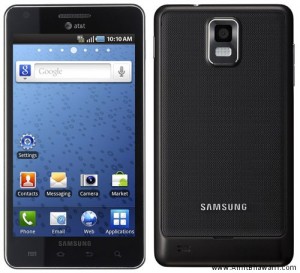
Samsung Infuse 4G Android Mobile with 8 MP Camera

Samsung Infuse 4G has been announced at CES 2011 which has got at terrific features. To start with we have got super AMOLED plus screen and it would be the first handset to incorporate AMOLED plus screen which will increase contrasts and readability about 50 percent more than the actual existing.
Samsung infuse 4G
With 1.2 GHz single core Hummingbird processor and looks to be the thinnest handset ever produced by AT & T. With whooping 4.5 inch runs on Android Froyo 2.2. The highlight features of this handset is its 4G capability and HSPA, HSDPA support.
One of the other outstanding features of Samsung Infuse is its camera which has got 8 Mega Pixel camera on the rare side and 1.3 Mega Pixel camera on the front side which is generally used for video calling. The camera can easily be able to take pictures & videos of up to 1920 x 1080 pixels.
Among other features of Samsung Infuse we have
  • Proximity sensor
  • Light sensor
  • Auto focus
  • Smile detection
  • Digital zoom
  • Multi shot
  • Self timer
  • Panorama
  • ISO control
From the multimedia point of view this handset includes playback of MP3, AAC, AAC+, WMA, MIDI and MPEG 4, H.263 & H.264 video playback. For further detailed information head to Samsung Infuse 4G Touch Phone with Super AMOLED Screen at Samsung Advices.